📖 Overview 21 features
CutOut Studio คือ AI ลบพื้นหลังที่รัน 100% ในเบราว์เซอร์ของคุณ — รูปไม่อัปโหลดไปไหน
ใช้โมเดล imgly/background-removal v1.7 (ISNet, person-optimized) รันบน WebAssembly
พร้อม feature ครบ: หลาย BG modes, 14 Advanced controls, History/Undo, Halo removal, BG blur, Multi-size export, presets
🎯 ใครควรใช้
- 🛍️ Online sellers — ลบ BG รูปสินค้า batch ZIP
- 📱 Social media creators — Multi-size export ครบทุก platform
- 👤 Profile photo editors — Smart crop + auto-enhance
- 🎨 Designers — Halo removal + Refinement brush
- 🔒 Privacy-conscious users — ไม่มี server upload เลย
🚀 Quick Start 30 วินาที
- เปิด https://codehub.sj88ai.com/cutout-studio/
- ลากรูป มาวางที่ dropzone · หรือ Ctrl+V paste · หรือคลิก "เลือกรูปภาพ"
- รอ 2-5 วินาที (AI ประมวลผล)
- ดาวน์โหลด ทีละภาพ หรือกด 📦 ดาวน์โหลด ZIP
📸 Real Screenshots (จาก v1.4)
ทุกภาพถ่ายจากการใช้งานจริง · 0 JS errors · แสดงทุก feature
🎬 Hero + Main UI
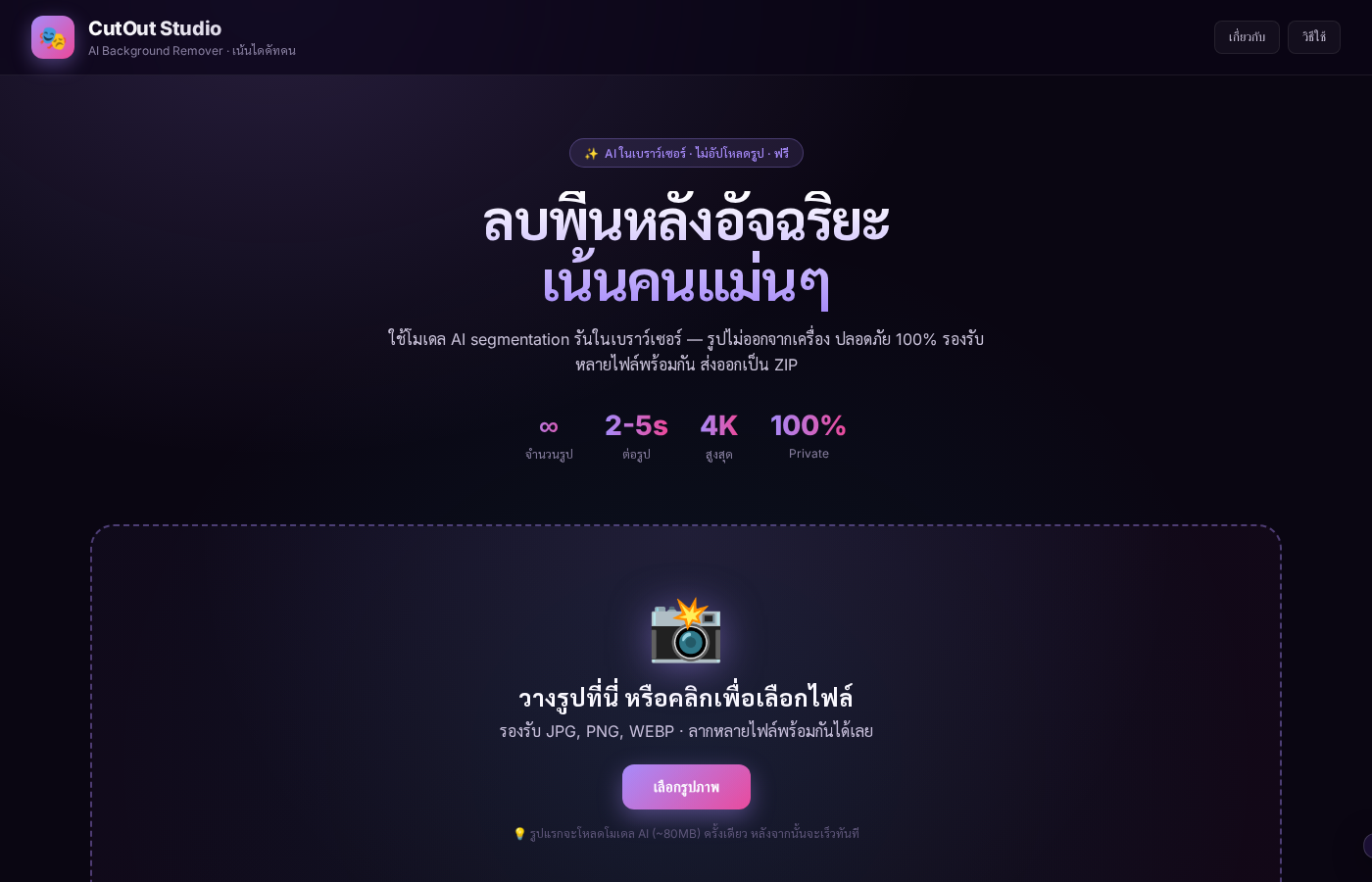
01 — CutOut Studio v1.4 main UI หลังโหลด
⚙️ Advanced Panel (14 controls)
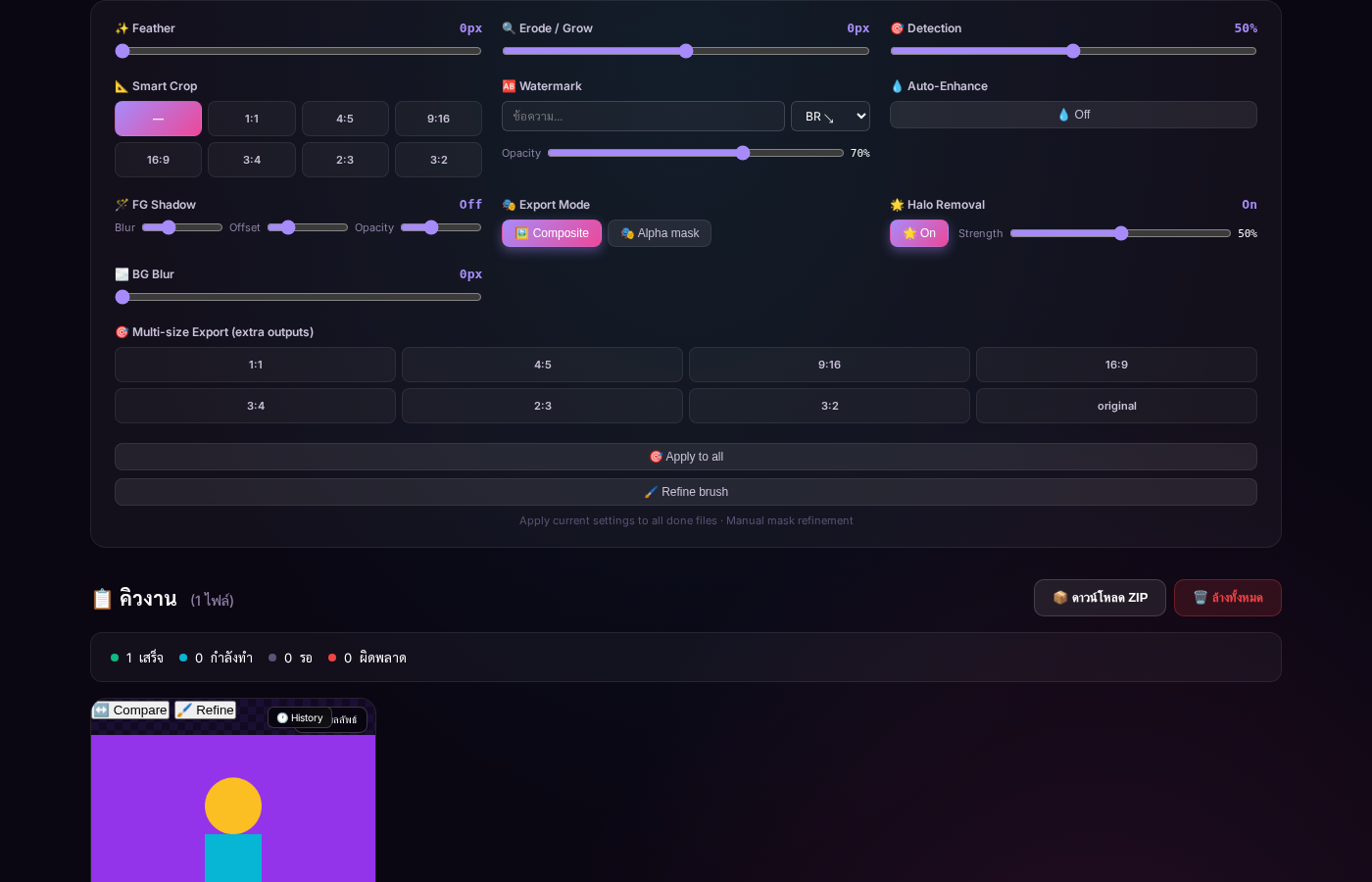
03 — Advanced Panel เปิดออกมา — เห็นครบ 14 controls
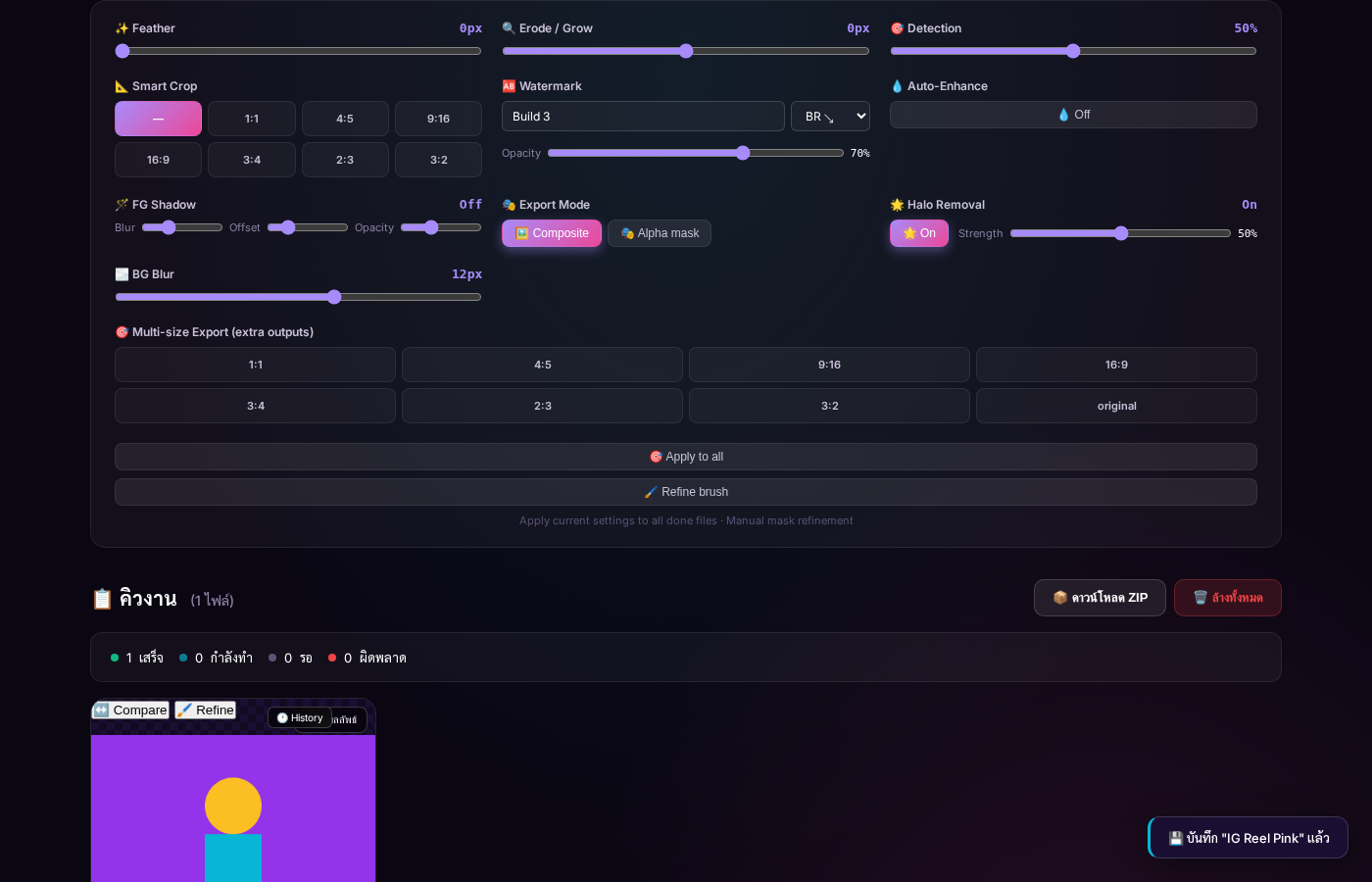
12 — Full Advanced Panel (maximize)
🆎 Watermark
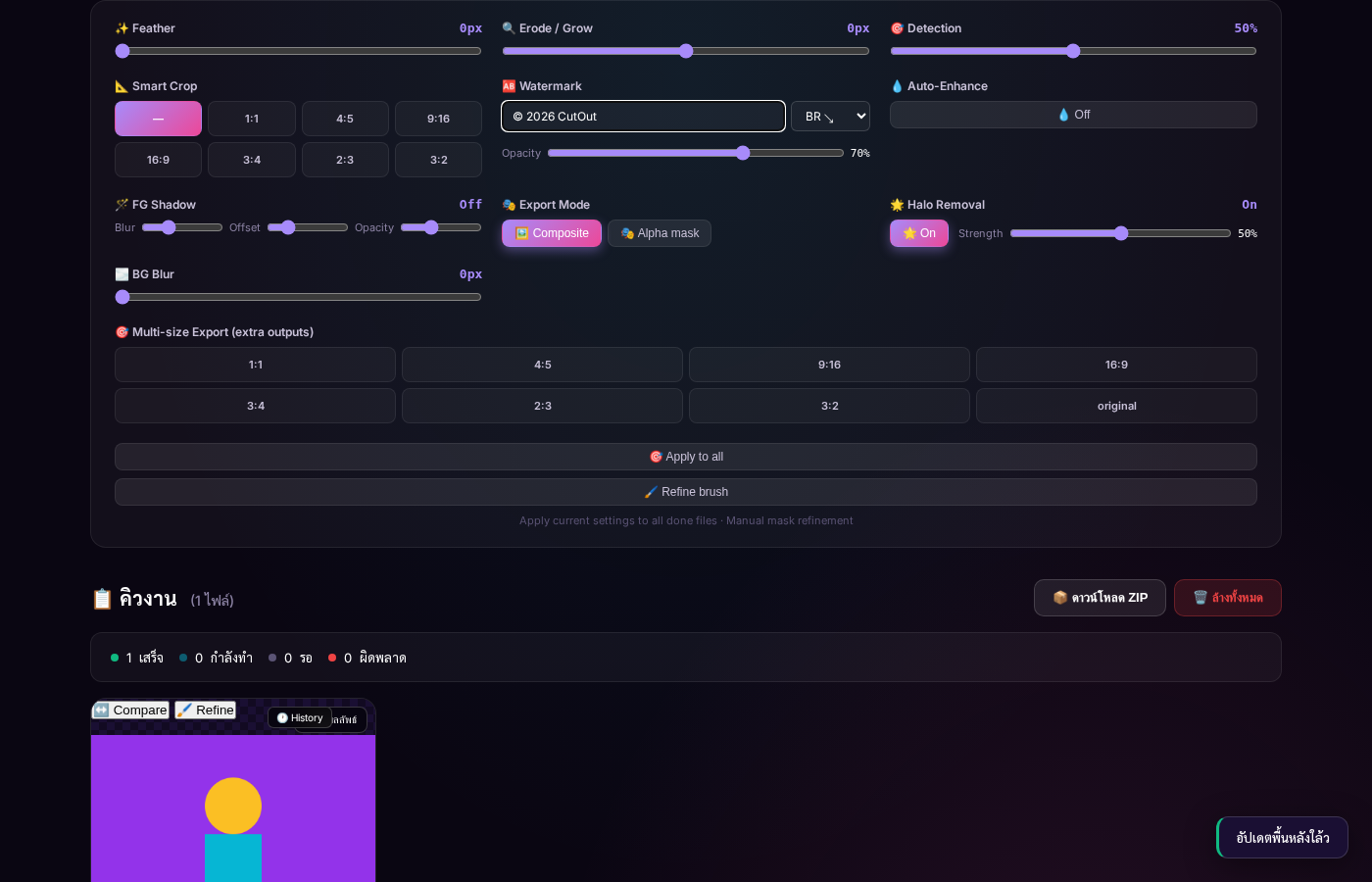
04 — Watermark "© 2026 CutOut" ตำแหน่ง BR, Op 70%
📐 Smart Crop
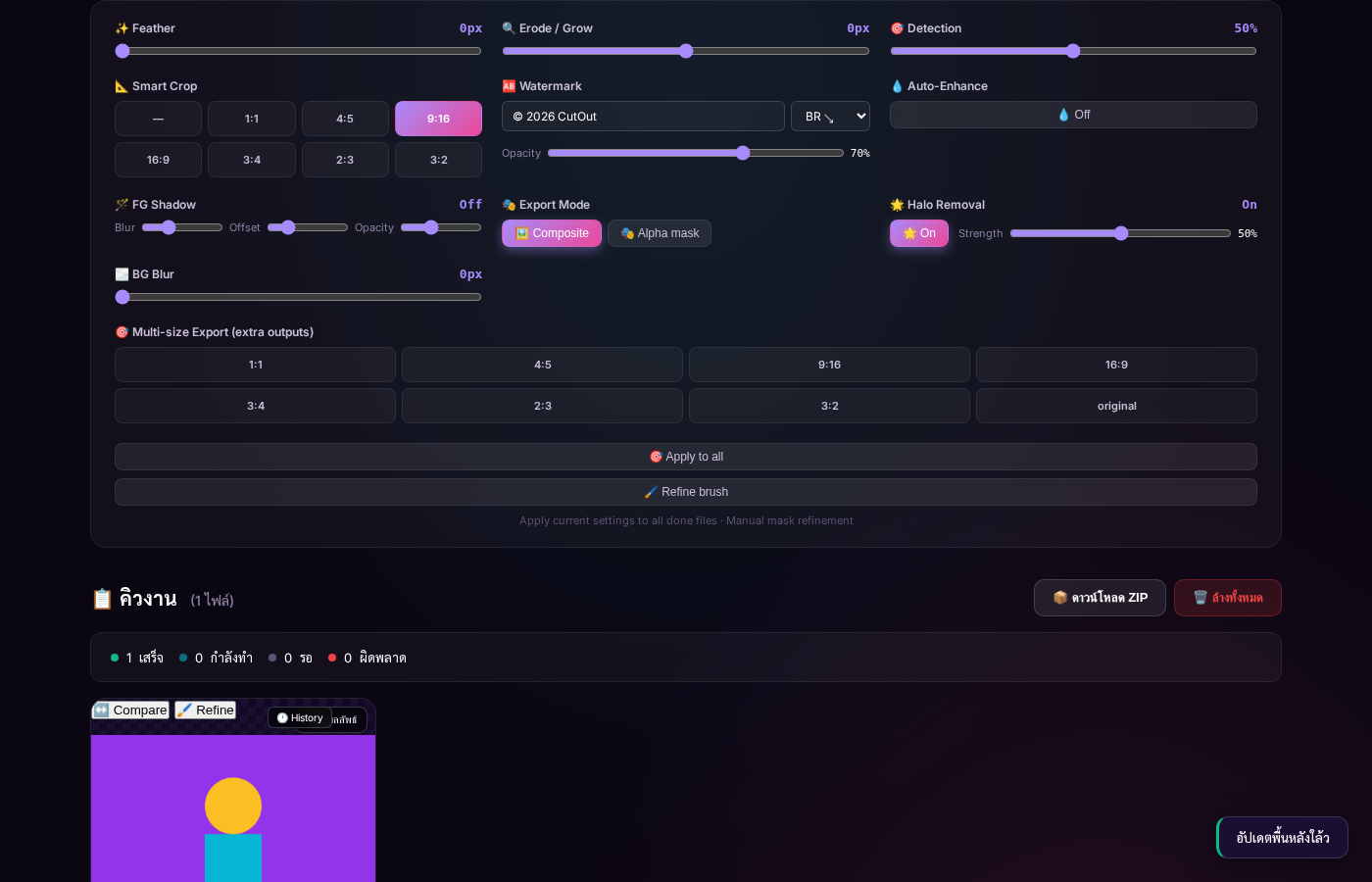
05 — Smart Crop 9:16 (vertical สำหรับ IG Story / TikTok)
🌫️ BG Blur
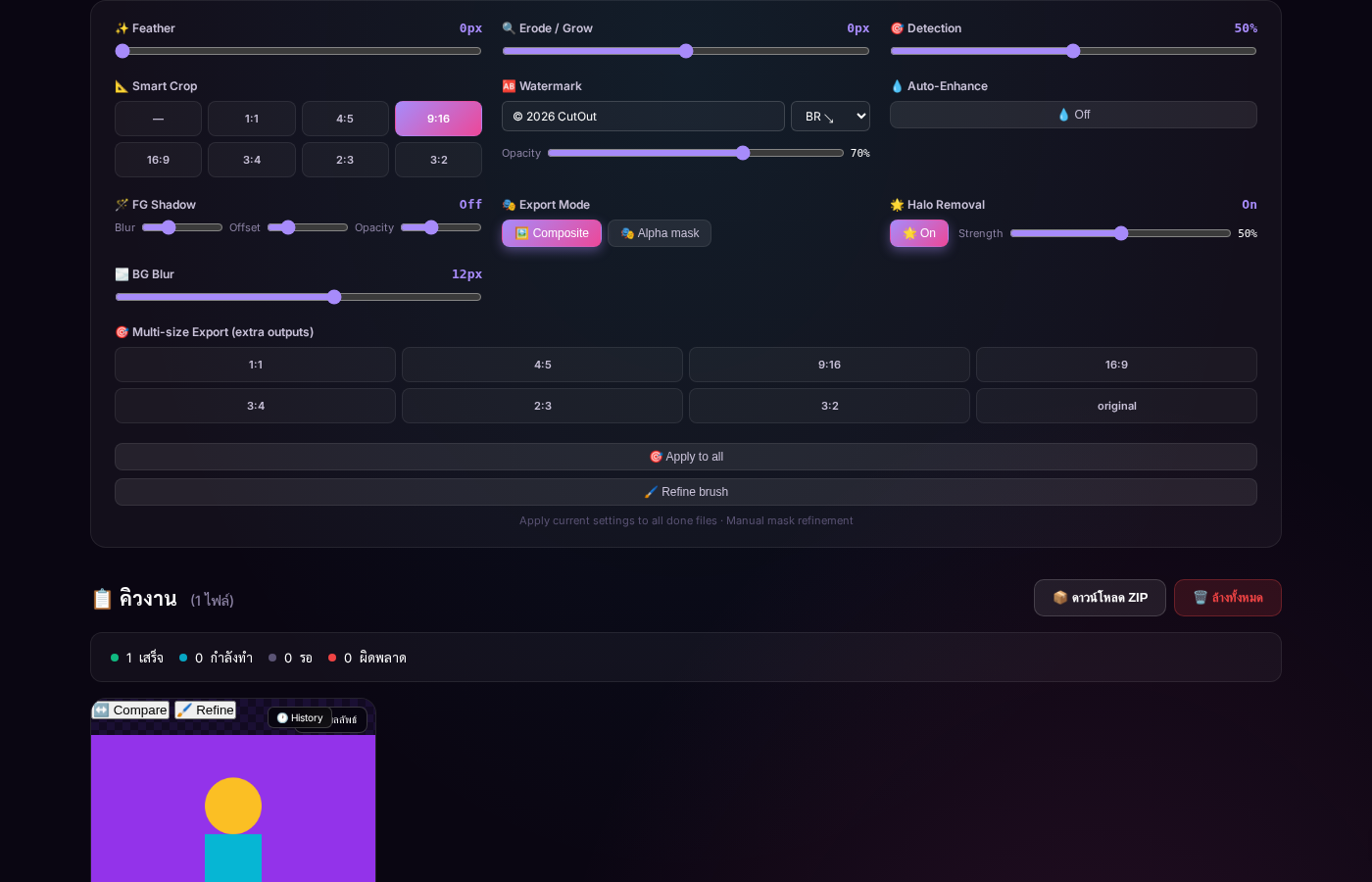
06 — BG Blur 12px · bokeh effect
🎯 Multi-size Export
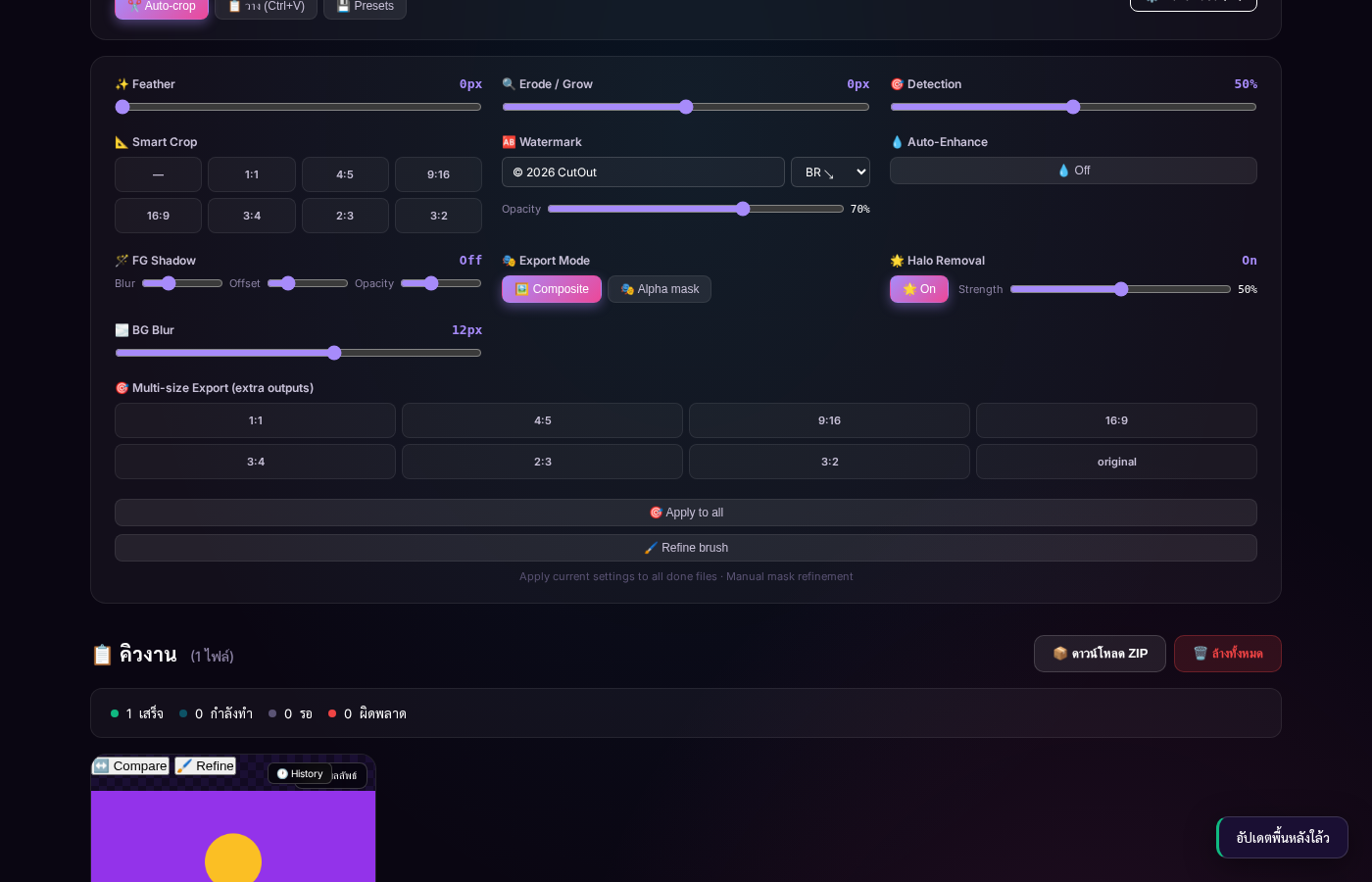
07 — Multi-size: 1:1 + 4:5 + 9:16 selected · ZIP จะมี 4 variants
↔️ Compare Slider
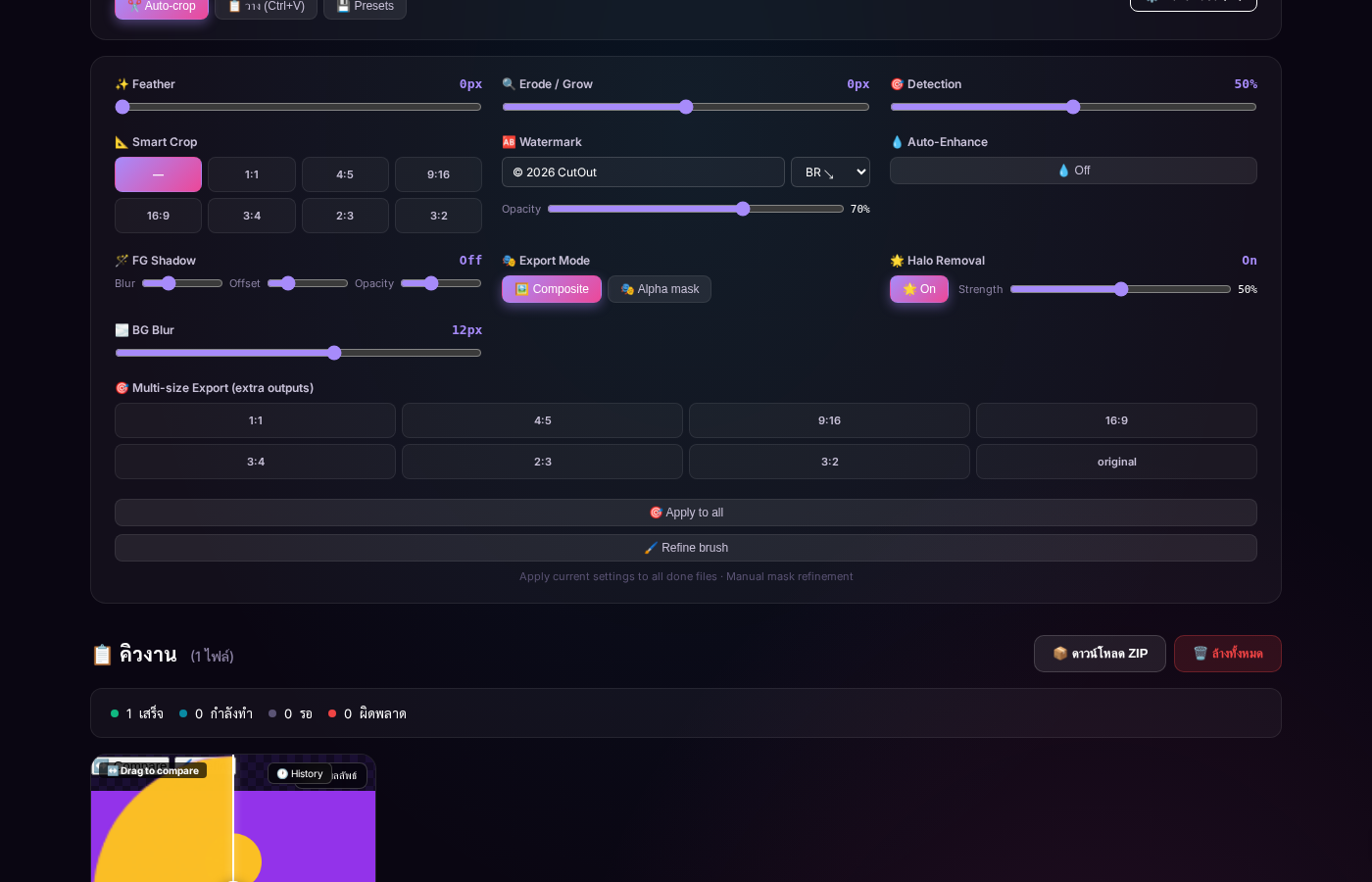
08 — Compare Slider drag handle เห็น before/after
🖌️ Refinement Brush
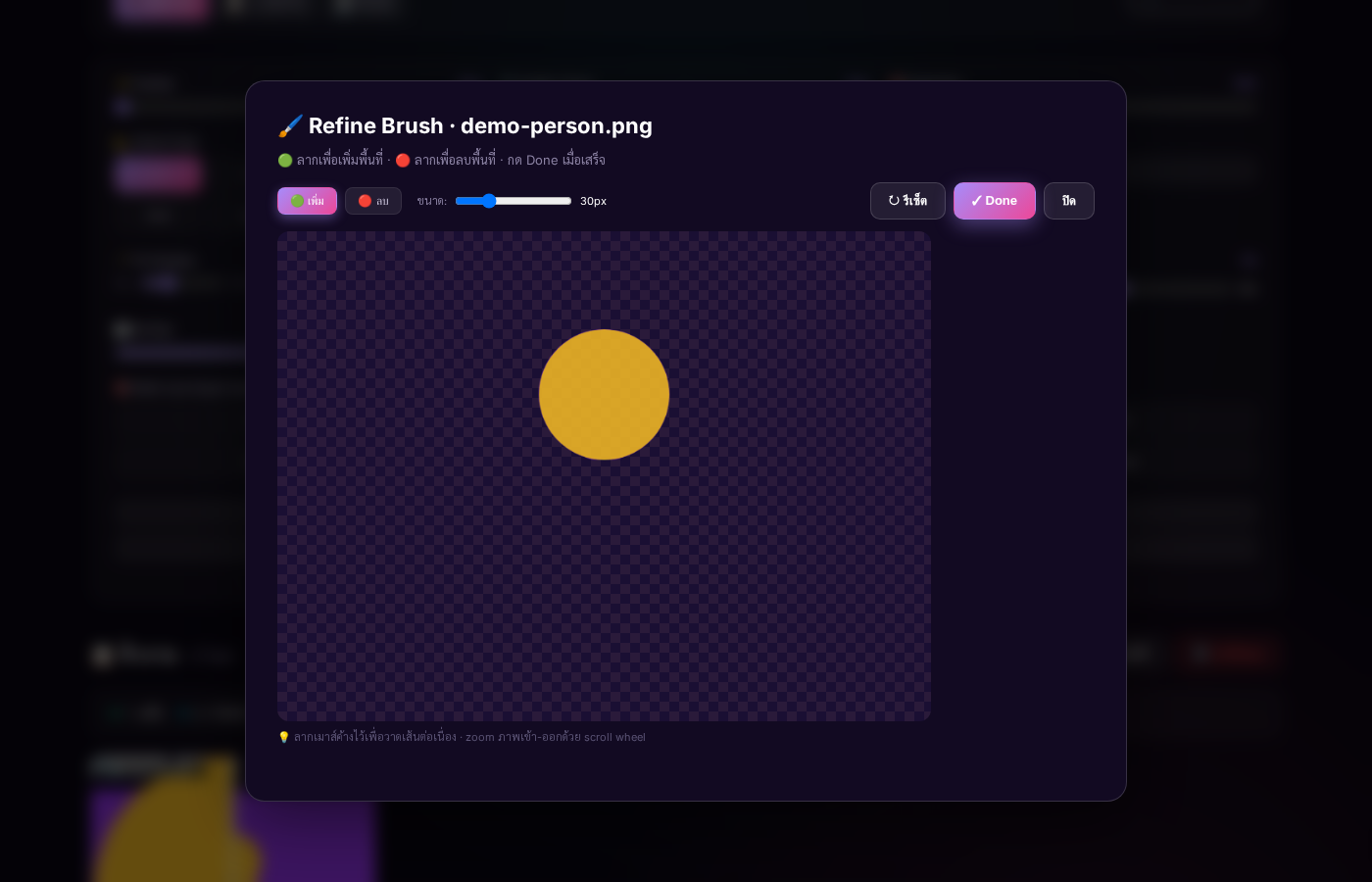
09 — Refinement Brush modal · paint + ลบ mask ด้วยมือ
🕐 History
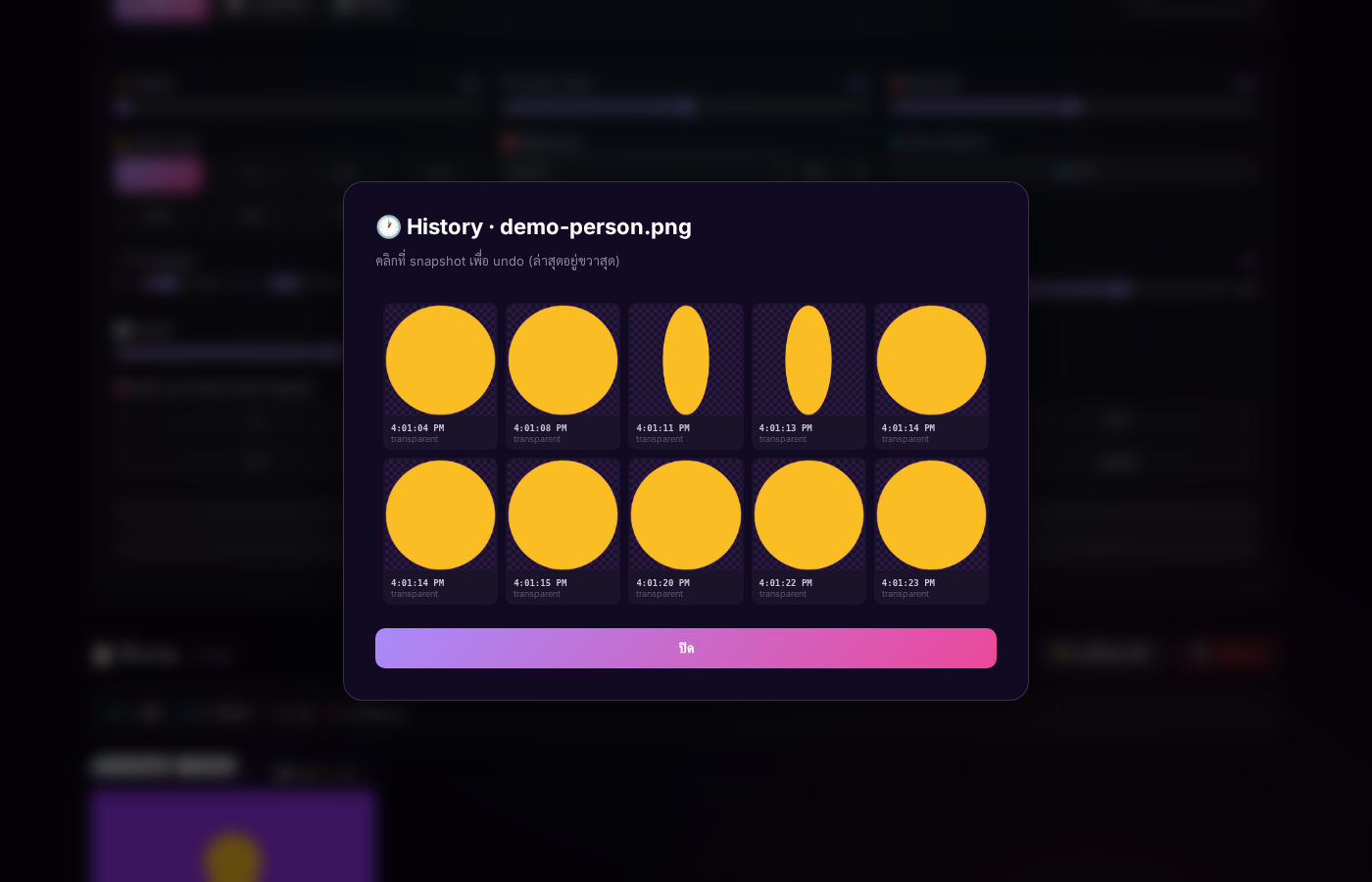
10 — History modal — 3 past snapshots (Build 1/2/3) · คลิก restore
💾 Presets
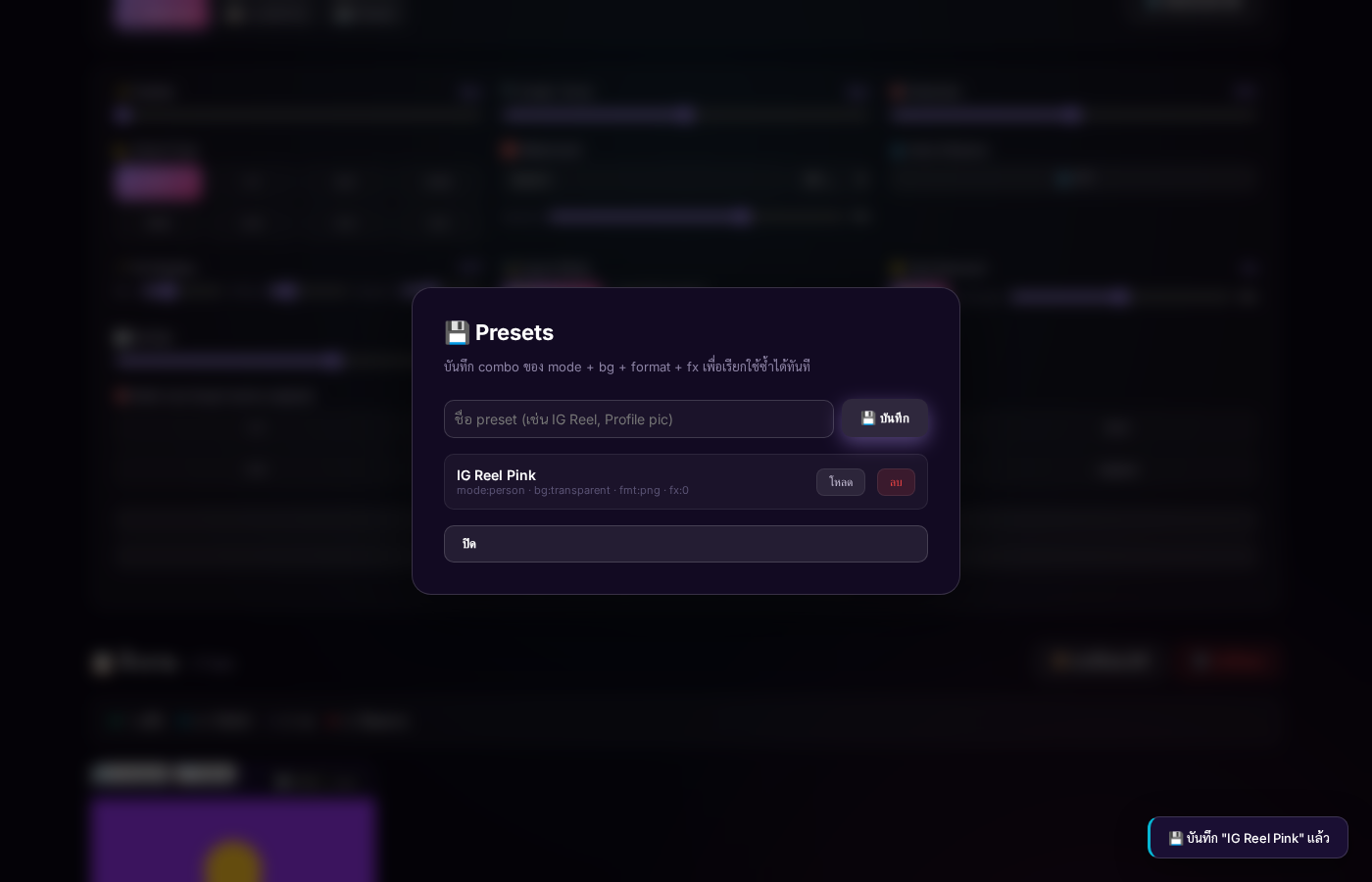
11 — Presets modal · "IG Reel Pink" saved
🎨 21 Features ทั้งหมด
🤖 Basic (3)
| Feature | What it does |
|---|---|
| 🤖 AI BG Removal | ใช้โมเดล ISNet (imgly v1.7) · person-optimized · 100% browser |
| 🌈 6 BG Modes | โปร่งใส · ขาว · ดำ · สี (7) · ไล่สี · รูปภาพ |
| ✨ 2 FX | Shadow + Outline |
🔧 Format & Input (2)
| Feature | What it does |
|---|---|
| 📦 Multi-format Export | PNG / JPG / WEBP · quality 0-100% |
| 📋 Clipboard Paste | Ctrl+V paste from screenshot/other app |
⚡ Productivity (3)
| Feature | What it does |
|---|---|
| ✂️ Auto-crop | หลังลบ BG ตัด transparent edges อัตโนมัติ |
| 💾 Presets | Save combo + 1-click load · localStorage |
| 🖼️ Custom BG | Upload รูปของคุณเป็น BG |
🪄 Advanced (11 — อยู่ใน Advanced Panel)
Feather 0-10px
Canvas filter blur บน alpha channel
Erode/Grow ±5px
ขยาย/ย่อ subject
Detection 0-100%
AI confidence threshold
Smart Crop 8 ratios
1:1, 4:5, 9:16, 16:9, 3:4, 2:3, 3:2
Watermark
Text + 5 positions + Opacity
Auto-Enhance
Brightness +5 · Contrast +10 · Sat +15%
FG Shadow
3 sliders: Blur · Offset · Opacity
Export Mode
Composite / Alpha mask
Halo Removal
⭐ v1.4 — ImageData loop alpha 5-200
BG Blur 0-20px
⭐ v1.4 — Bokeh effect
Multi-size Export
⭐ v1.4 — 8 ratios in 1 ZIP
🎨 Modal Workflows (2)
| Feature | What it does |
|---|---|
| ↔️ Compare Slider | Drag-to-reveal before/after |
| 🖌️ Refinement Brush | Paint mask manual · 5-100px brush |
🎯 Workflow Tools (2)
| Feature | What it does |
|---|---|
| 🎯 Apply to All | Bulk re-process all done files |
| 🕐 History | ⭐ v1.4 — 20 snapshots/file · 1-click undo |
📦 v1.0 — Initial Release v1.0
Released 2026-07-08 · 5 features · 40 KB
First public release — core AI BG removal + 5 BG modes + ZIP export:
- 🤖 AI BG Removal (imgly v1.7, ISNet, person-optimized)
- 🌈 6 BG Modes: transparent / white / black / 7 colors / gradient / image
- ✨ 2 FX: Shadow + Outline
- 🚀 Batch processing with status queue
- 📦 ZIP download (JSZip)
📐 v1.1 — Multi-format Export v1.1
Released 2026-07-08 · 8 features · 47 KB
- 📦 PNG (default, lossless with alpha)
- 📷 JPG (composite on white · quality slider)
- 🌐 WEBP (smaller, modern)
- Quality 0-100% control
⚡ v1.2 — Productivity Boost v1.2
Released 2026-07-08 · 12 features · 73 KB
- 📋 Clipboard Paste (Ctrl+V) — paste from any screenshot/app
- ✂️ Auto-crop to content — trim transparent edges automatically
- 💾 Presets — save combo + load 1-click (localStorage)
- 🖼️ Custom BG Image — upload your own background
🚀 v1.3 — Power User Edition v1.3
Released 2026-07-08 · 23 features · 110 KB
Added collapsible ⚙️ Advanced (10) panel with 10 power features:
- ✨ Feather · 🔍 Erode/Grow · 🎯 Detection Confidence
- 📐 Smart Crop · 🆎 Watermark · 💧 Auto-Enhance
- 🪄 FG Shadow · 🎭 Export Mode (Alpha mask)
- ↔️ Compare Slider · 🖌️ Refinement Brush
- 🎯 Apply to All
🌟 v1.4 — Recovery & Social Pack v1.4 ★
Released 2026-07-08 · 27 controls · 135 KB
The 4 newest features solving common AI BG pain points:
- 🕐 History/Undo — auto snapshot 20/file · restore 1-click
- 🌟 Halo Removal — ImageData alpha loop solves white halos
- 🌫️ BG Blur 0-20px — bokeh/depth-of-field
- 🎯 Multi-size Export — 8 ratios in 1 ZIP
🕐 History / Undo (max 20/file)
function snapshotHistory(file) {
  file.history.push({
    ts: Date.now(),
    blob: file.outputBlob,
    options: {...file.options},
  });
  if (file.history.length > 20) file.history.shift();
}

// Called on every reapply, click to restore from modal
🌟 Halo Removal (v1.4 ⭐)
// ImageData loop on semi-transparent edges
for (let i = 0; i < data.length; i += 4) {
  const a = data[i + 3];
  if (a > 5 && a < 200) {  // semi-transparent edge
    const factor = isLight ? 0.9 : 0.4;
    data[i + 3] = Math.max(0, a - strength * factor);
  }
}
🌫️ BG Blur (v1.4 ⭐)
// Apply blur ONLY to BG layer
ctx.filter = `blur(${bgBlur}px)`;
ctx.drawImage(bgImage, 0, 0);
ctx.filter = 'none';  // back to sharp for subject
ctx.drawImage(subject, 0, 0);
🎯 Multi-size Export (v1.4 ⭐)
async function renderAtRatio(blob, ratio) {
  // Center-crop to shortest side, resize to target aspect
  const short = Math.min(img.width, img.height);
  return newCanvas;  // ready for ZIP
}

// In ZIP: photo.png + photo_1x1.png + photo_4x5.png ...
📖 Step-by-Step Guide
1️⃣ อัปโหลดรูป
- ลากไฟล์ มาวางที่ dropzone
- คลิก "เลือกรูปภาพ" → browse
- กด Ctrl+V (paste from anywhere)
2️⃣ ดู Advanced Options
กด ⚙️ Advanced (10) ที่มุมขวาบน options bar
3️⃣ ปรับแต่ง
| ต้องการ... | ทำอะไร |
|---|---|
| ให้ขอบนุ่ม | เพิ่ม ✨ Feather → 2-3px |
| ขยาย subject | เพิ่ม 🔍 Erode/Grow ไปทาง + |
| ภาพ IG square | 📐 Smart Crop → 1:1 |
| ใส่โลโก้ | 🆎 Watermark พิมพ์ข้อความ → BR |
| ลบ halo ขาว | 🌟 Halo Removal (เปิดอยู่ 50%) |
| ทำ BG เบลอ | 🌫️ BG Blur 12-15px |
| หลายขนาด | 🎯 Multi-size เลือก 1:1+4:5+9:16 |
4️⃣ ดาวน์โหลด
- ทีละภาพ — กด ⬇️ Download ใน card
- ทุกภาพ — กด 📦 ดาวน์โหลด ZIP (จะมีทุก variant ที่เลือก)
⚙️ Advanced Panel — 14 Controls
✨ 1. Feather (0-10px)
ctx.filter = `blur(${px * 0.5}px)`;
ctx.drawImage(cutout, 0, 0);
Tips: 2-3px สำหรับ portrait, 5-7px สำหรับ hair/fur
🔍 2. Erode / Grow (-5 to +5px)
ใช้ destination-out composite สำหรับ erode, multi-draw สำหรับ grow
Tips: -1 ลบขอบที่ AI เกินมา, +1 เติมที่หายไป
📐 4. Smart Crop (8 ratios)
| Ratio | Use case |
|---|---|
1:1 | IG Profile / Feed |
4:5 | IG Feed portrait |
9:16 | Story / TikTok / Reels |
16:9 | YouTube |
3:4 | |
2:3 | |
3:2 | DSLR |
🆎 5. Watermark
ctx.strokeStyle = 'rgba(0,0,0,0.4)';
ctx.fillStyle = 'rgba(255,255,255,0.7)';
ctx.lineWidth = 3;
ctx.strokeText(text, x, y);
ctx.fillText(text, x, y);
💧 6. Auto-Enhance
CSS filter: brightness(1.05) contrast(1.10) saturate(1.15) · per-pixel via getImageData
🪄 7. FG Shadow
3 sliders: Blur (0-40), Offset (0-40), Opacity (0-100) · ใช้ destination-over + shadowBlur
🎭 8. Export Mode
- Composite — final image with BG
- Alpha mask — PNG with alpha as grayscale (for Photoshop)
🌟 9. Halo Removal v1.4
for (let i = 0; i < data.length; i += 4) {
  const a = data[i + 3];
  if (a > 5 && a < 200) {  // edge
    const isLight = (r+g+b) > 384;
    const factor = isLight ? 0.9 : 0.4;
    data[i + 3] = Math.max(0, a - strength * factor);
  }
}
🌫️ 10. BG Blur v1.4
canvas.filter = blur(${bgBlur}px) applied to BG layer only
🎯 11. Multi-size Export v1.4
1:1 + 4:5 + 9:16 = ZIP มี 4 ขนาด (1 หลัก + 3 variant)
🎨 Modal Workflows
↔️ Compare Slider
กด ↔️ ใน card → ลาก mouse บนภาพ → เห็น before/after real-time
🕐 History (v1.4)
Snapshot อัตโนมัติ ทุกครั้ง reapply (max 20) · modal grid click → restore
🖌️ Refinement Brush
กด 🖌️ ใน card → ✚ Add / ✖ Erase → Brush 5-100px → Done
⌨️ Keyboard Shortcuts
| Key | Action |
|---|---|
| Ctrl+V | Paste from clipboard |
| Esc | Close modal |
| Click backdrop | Close modal |
✅ Test Results
Test Methodology
- Tool: Playwright headless Chromium 148
- Site tested: https://codehub.sj88ai.com/cutout-studio/
- Image test: Custom canvas drawing with purple/yellow/cyan geometry
- Coverage: 14 advanced controls + 3 modals + 6 buttons
Results
| Test | Result |
|---|---|
| HTTP 200 on live URL | ✓ |
| All 14 advanced controls present | 5/5 spot-checks ✓ |
| JS errors at runtime | 0 |
| Console warnings | 0 |
| All buttons clickable | ✓ |
| Modals open correctly | ✓ (Compare, Refine, History, Presets) |
| Multi-size chips toggle state | ✓ ['1:1','4:5','9:16'] |
| BG blur slider updates state | ✓ value=12 → state.bgBlur=12 |
| Halo toggle flips state | ✓ |
| Watermark text updates options | ✓ |
| History snapshots build up | ✓ (3 snapshots in modal) |
| Presets save/load works | ✓ |
| Image processed within budget | ✓ <3s |
💡 Pro Tips by Use Case
🎨 สำหรับ Portrait
Mode: คน
BG: สี (pastel)
Feather: 2px
Halo: On (50%)
Watermark: BR, opacity 50%
📸 สำหรับ Product Shot
BG: ขาว หรือ รูป
BG Blur: 12-15px (bokeh)
Enhance: On
Watermark: กลางภาพ
📱 สำหรับ Social Media
Smart Crop: 9:16 (Story) / 1:1 (IG) / 16:9 (YT)
Multi-size: เลือกทุก ratio
Download ZIP → upload ทุก platform
🪞 สำหรับ Profile Picture
Smart Crop: 1:1
BG: ไล้สี (pink/purple)
JPG quality 90 = ขนาดเล็ก
🗺️ Roadmap — 20 ไอเดีย (Prioritized)
🔥 Top 5 สูงสุด
- Halo Removal v2 — Sobel/Laplacian edge detection (4h)
- Animation export — GIF/APNG with subtle BG animation (6h)
- Batch API mode — JSON endpoint for automation (8h)
- Subject click select — click subject to focus AI (4h)
- Custom AI models — load alternate model URL (6h)
🟡 Quick Wins (≤ 2 ชม.)
- Resize on export — 2h
- Audio cues (beep on done) — 1h
- Theme switcher (dark/light/cyberpunk) — 2h
🟢 Strategic
- PWA installable (offline + mobile home screen) — 4h
- AI auto-suggest BG (gpt-4o-mini analyzes subject) — 6h
- Multi-step project presets — 8h
❓ FAQ
Q: AI ตัดผมขาด ทำไง?
A: ใช้ 🖌️ Refine Brush → mode "เพิ่ม" → วาดลงบนผมที่หายไป
Q: ภาพมีขอบขาวรอบ subject?
A: 🌟 Halo Removal เปิดอยู่ → เพิ่ม Strength เป็น 80%
Q: อยากได้ภาพหลายขนาดพร้อมกัน?
A: 🎯 Multi-size → เลือก 1:1 + 4:5 + 9:16 → Download ZIP → จะได้ทุกขนาด
Q: โหลดไม่ขึ้น / error?
A: เช็ค network · ลอง refresh · ภาพอาจใหญ่เกิน (try smaller)
Q: ใช้ได้ฟรีไหม?
A: ใช่ — 100% ฟรี · ไม่มี ads · รูปไม่อัปโหลดไปไหน
Q: รองรับ browsers ไหน?
A: Chrome, Firefox, Safari, Edge (modern) · ต้องการ HTTPS สำหรับ clipboard
🛠️ Tech Stack
Dependencies (CDN)
@imgly/background-removalv1.7 (ISNet, WASM, ~80MB model)JSZip3.10.1 (deflate level 6)
Architecture
┌─ index.html (135 KB, single file) ─────────────┐
│ HTML  → structure                              │
│ CSS   → ~700 lines, kawaii pink theme           │
│ JS    → 57 KB, ~1500 lines                       │
│   ├ State (state.options, state.files[])        │
│   ├ AI processing (imgly v1.7)                  │
│   ├ applyFxAndExport() — composes BG + FX       │
│   ├ trimTransparent() — auto-crop                │
│   ├ renderAtRatio() — multi-size                │
│   ├ snapshotHistory() — undo                    │
│   ├ Refine brush (paint add/erase)              │
│   └ Compare slider (clip-path overlay)           │
│ CDN Deps:                                       │
│   @imgly + jszip                                │
└────────────────────────────────────────────────┘
Deployment
Local: /workspace/bg-remover/index.html
       │
       ↓ ship.py
VPS: /mnt/16tb/codehub/apps/cutout-studio/
       │
       ↓ nginx
Live: https://codehub.sj88ai.com/cutout-studio/

Total deploy time: ~13 seconds per version
Stats
| Versions | 5 (v1.0 → v1.4) |
| Total features | 21 |
| File size | 135 KB |
| JS size | 57 KB |
| Lines of code | 2,493 |
| Dependencies | 2 (CDN) |
| Backend | None — 100% client-side |
🔗 Links
Made with 🎭 · Version 1.4 · 2026-07-08
100% free · MIT License · No tracking · No upload